Baroque pitch (A = 415 Hz): why it reads as 440 Hz, and how to convert it
Recordings of Baroque music on period instruments are often tuned to A = 415 Hz, a semitone below modern pitch, and FourThirtyTwo’s Auto-detect reads them as about 440 Hz. This guide explains why, what the Baroque pitch option does, and how to choose the right reading before you convert.
In short
- Many period-instrument recordings are tuned to A = 415 Hz, one semitone below 440.
- Auto-detect only measures tuning within one semitone, so it reads them as about 440 Hz.
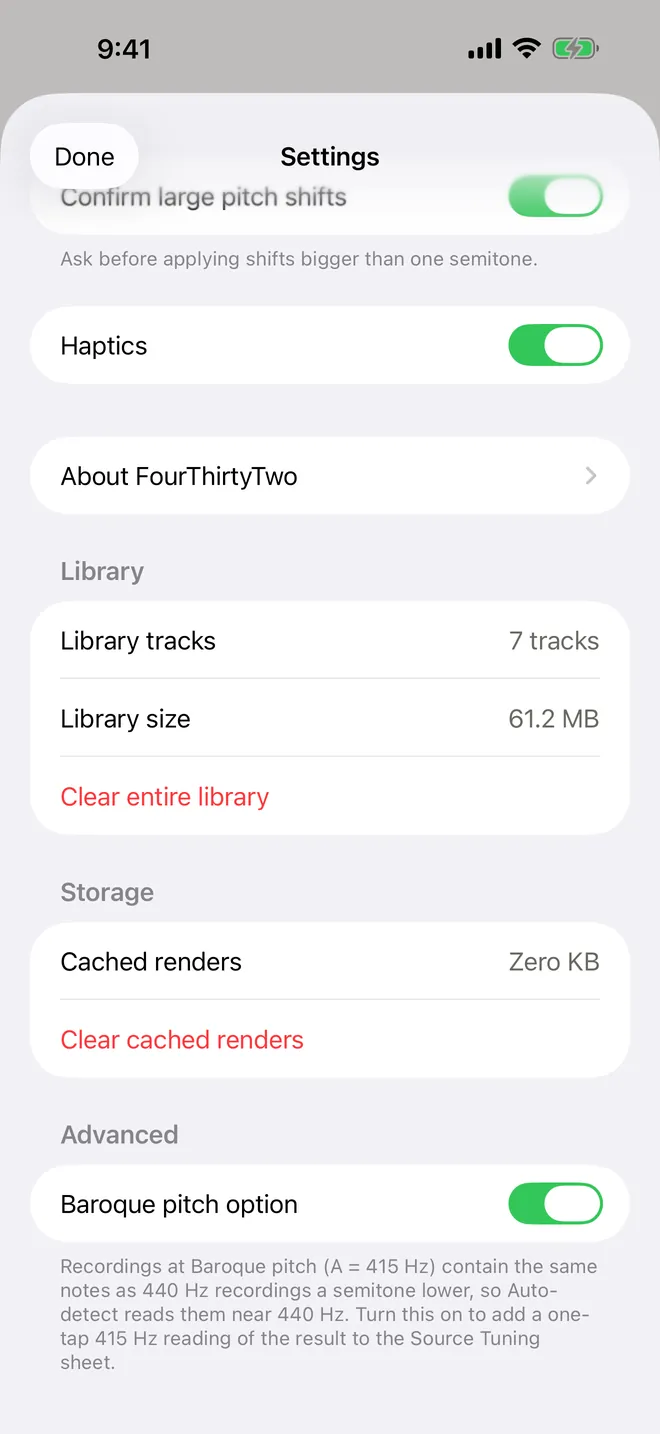
- Turn on Settings › Advanced › Baroque pitch option. The Source Tuning sheet then offers the same result read as 415 Hz once Auto-detect has run.
- Both readings are in tune. They differ by one semitone, so choose by the key you want the music to end up in.
What Baroque pitch is
There has never been one fixed concert pitch. Before the 20th century, the A that orchestras tuned to varied from city to city and decade to decade. Today most music is tuned to A = 440 Hz (ISO 16).
Ensembles that play Baroque music on period instruments usually tune lower, to A = 415 Hz. It’s a modern compromise, not a single historical standard. 415 Hz is almost exactly one equal-tempered semitone below 440 (the exact figure is 415.3 Hz), which makes it easy to move keyboard instruments between the two. If a recording’s liner notes say “A = 415” or “period instruments”, it’s probably at Baroque pitch.
Why Auto-detect reads 415 Hz as 440 Hz
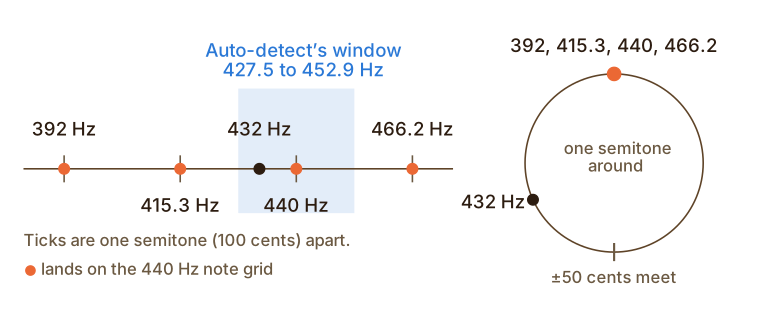
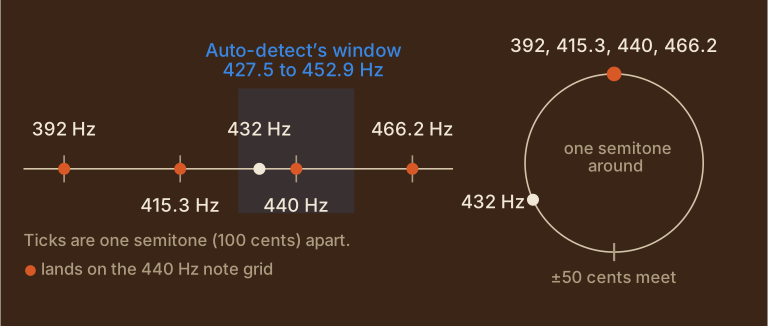
Auto-detect doesn’t know which notes a piece uses. It measures how far the notes sit from the nearest note of a 440 Hz scale, in cents (hundredths of a semitone). That scale repeats every semitone, so the measurement wraps around like a clock face. Go 50 cents sharp and you meet the point that is 50 cents flat.
A recording at 415.3 Hz is exactly one semitone, 100 cents, below 440. Every note it plays lands precisely on a note of the 440 Hz scale: its A is 440’s G♯, its B♭ is 440’s A, and so on. From the notes alone, it’s indistinguishable from a 440 Hz recording of the same music a semitone lower. So Auto-detect reports about 440 Hz. It always reports something between 427.5 and 452.9 Hz, the range one semitone wide around 440.
Show the calculated values
| Reference pitch | Distance from 440 Hz | Auto-detect reads about |
|---|---|---|
| 392.0 Hz (French Baroque) | −200.0 cents | 440.0 Hz |
| 415.0 Hz (Baroque) | −101.3 cents | 439.7 Hz |
| 430.0 Hz (Classical) | −39.8 cents | 430.0 Hz |
| 432.0 Hz (a popular alternative) | −31.8 cents | 432.0 Hz |
| 435.0 Hz (French standard, 1859) | −19.8 cents | 435.0 Hz |
| 440.0 Hz (Modern standard (ISO 16)) | +0.0 cents | 440.0 Hz |
| 466.2 Hz (Venetian and German church pitch) | +100.0 cents | 440.0 Hz |
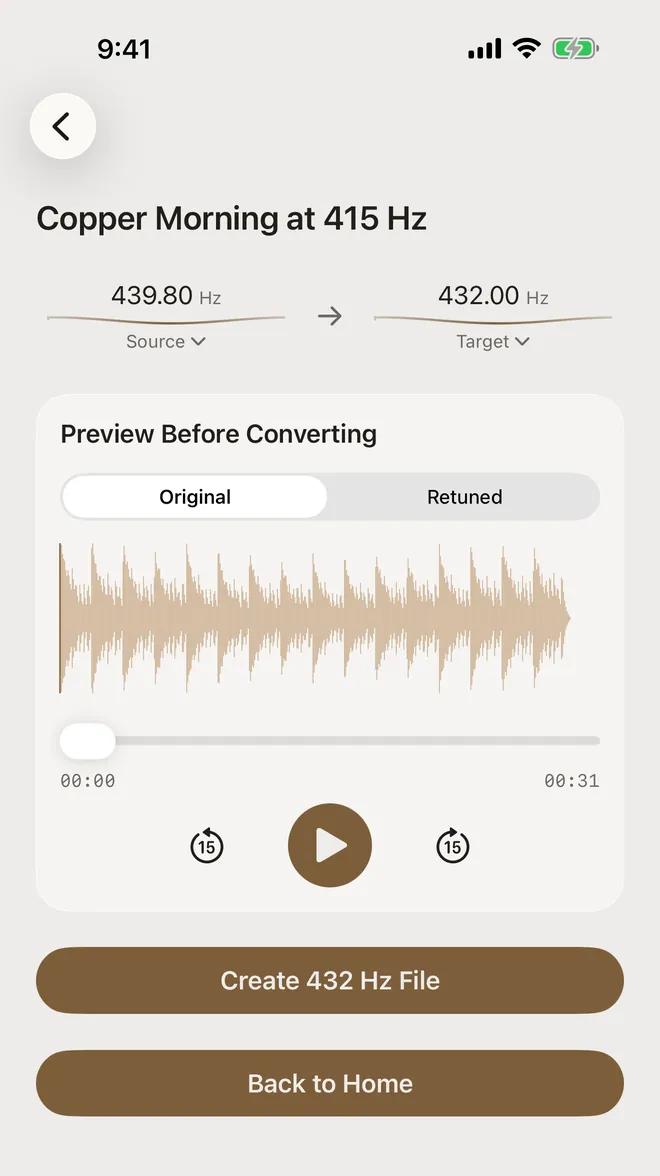
We checked this on a version of our test track “Copper Morning” rendered at A = 415 Hz. Auto-detect read 439.8 Hz, within half a cent of where 415 Hz lands on the circle (439.7 Hz).
Two readings, same notes
The Baroque pitch option doesn’t measure anything new. It takes Auto-detect’s result and reads it one semitone lower: 439.8 Hz becomes 415.1 Hz. Both readings describe the same sounds, so both conversions come out in tune at A = 432 Hz. What changes is how far the music moves, and which key it lands in.
| Source | Shift | Written A becomes |
|---|---|---|
| Auto-detect, 439.8 Hz | −31.0 cents | 407.6 Hz (G♯) |
| Baroque pitch, 415.1 Hz | +69.1 cents | 431.9 Hz (A) |
- Choose Baroque pitch to hear the music in the key it was written in, at A = 432 Hz. The musicians’ A becomes 432 Hz. The recording moves up by about two thirds of a semitone.
- Keep Auto-detect’s reading to change the recording as little as possible. It moves down by about a third of a semitone, like any 440 Hz track. The music ends up one semitone below its written key.
Neither is wrong. If you’re not sure, preview both: set each source in turn and switch between Original and Retuned (see how to compare).
Step by step
-
Turn on the Baroque pitch option
Tap the gear icon on the home screen to open Settings. Scroll to Advanced and turn on Baroque pitch option. It’s off by default because most music isn’t at 415 Hz. You only need to do this once.
-
Import the recording and run Auto-detect
Import the track as usual (how to import). Tap the source value under Assumed, then Auto-detect. For our 415 Hz track the source changed to 439.8 Hz.
-
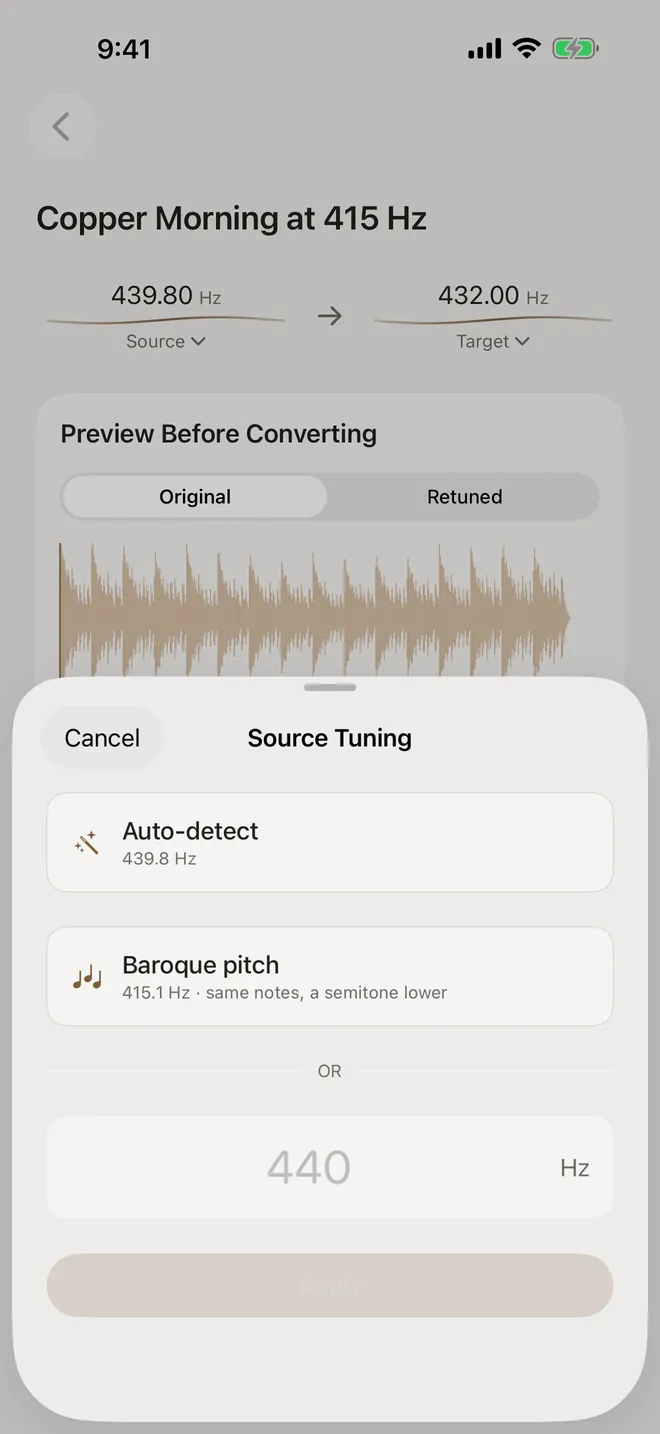
Choose the Baroque reading
Tap the source value again. Under Auto-detect, the Source Tuning sheet now shows Baroque pitch with the result read a semitone lower. Tap it to use 415.1 Hz as the source. The row only appears after Auto-detect has a result.
-
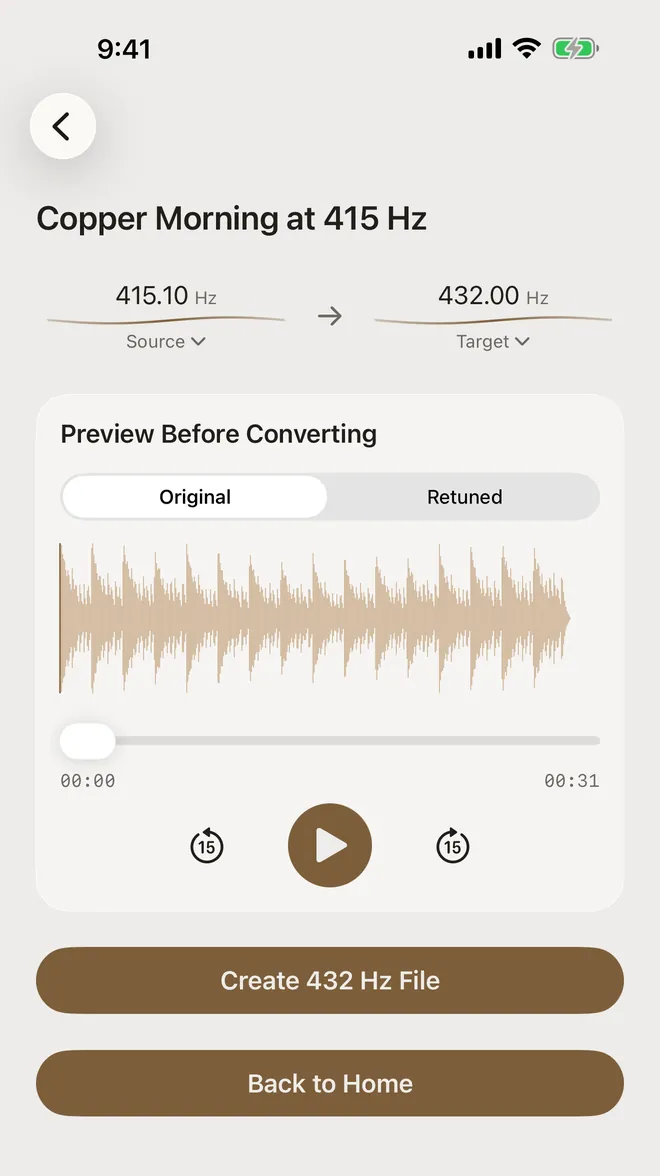
Convert as usual
The source now reads 415.1 Hz. Choose the target and tap Create 432 Hz File. To go back to the smaller shift, open the sheet and tap Auto-detect to measure again.
Other historical pitches
The same wrap-around applies to any tuning a whole number of semitones from 440 Hz. The Baroque pitch row only covers the most common case, one semitone down. For the others, type the value in the Source Tuning sheet, which accepts anything from 300 to 600 Hz.
- 392 Hz, used for some French Baroque music, is two semitones below 440. Auto-detect reads it as about 440 Hz, and the Baroque row offers 415.3. Type 392 instead.
- About 466 Hz, used for some 17th-century Venetian and German church music, is a semitone above 440. It also reads as about 440 Hz. Type the value from the liner notes.
- 430 and 435 Hz, common for Classical-era and 19th-century repertoire, are less than half a semitone from 440. Auto-detect reads them directly.
- Tunings near the edges of the window can wrap to the other side. A recording at 427 Hz, for example, is 52 cents below 440 and reads as about 452 Hz. If the result looks surprising, trust the liner notes.
Converting to Baroque pitch
It works in the other direction too. 415 Hz (Baroque) is one of the target presets, so you can move a modern 440 Hz recording down to Baroque pitch, for example to practise with a period ensemble. That shift is −101.3 cents, slightly more than a semitone, so the app asks you to confirm before it converts. You can turn that question off in Settings.
Limits
- Auto-detect can’t tell you which reading is right. Only the liner notes or the performers know that. The Baroque pitch row is a relabelling of the same measurement, not a second opinion.
- Batch conversion has no Baroque reading. A batch assumes 440 Hz, or uses Auto-detect’s reading after Auto-detect all, and has no way to type a source. For a whole album at 415 Hz, convert the tracks one at a time.
- Pitch history is messy. Real historical pitches varied far more than a handful of round numbers suggest. Treat the values here as common reference points, not exact history.
About the audio in these screenshots. “Copper Morning at 415 Hz” is our original test track “Copper Morning”, rendered at A = 415 Hz for this guide. The app imported it through the normal Files picker and ran Auto-detect on the device. The diagram and the two tables on this page are calculated, not measured.
Try it on your own music
FourThirtyTwo is a one-time purchase for iPhone and iPad. No subscription, no account, and your audio never leaves your device.


Requires iOS or iPadOS 18 or later.
More guides
- Convert music to 432 Hz on iPhone and iPadThe complete walkthrough: import a song, preview it, create the 432 Hz file, and keep or export it.
- Change a song from 440 Hz to 432 HzCheck a recording’s real tuning with Auto-detect, then set the exact source and target pitch.
- Batch convert an album or folder to 432 HzQueue many files or a ZIP, auto-detect each track’s tuning, and convert them in one pass.
- Compare 432 Hz vs 440 Hz before convertingFlip between the original and a 432 Hz preview while the song plays, and decide with your ears.
- Export 432 Hz music as FLAC, ALAC, or MP3Pick the right format (MP3, AAC, ALAC, FLAC or WAV) and save it to Files or share it.